
AI主图批量生成提示词:1小时出100张不重样,电商美工再也不用熬夜修图了
2026-07-28 10:13:09
78
AI智能编辑DM
AIGC
电商运营
AI绘图
商品主图
批量生图
一、痛点:一张主图修到凌晨,旺季根本忙不过来
做电商的都懂,主图就是货架上的"第一眼情人"。客户滑动页面时,0.3秒决定点不点进来。可现实是:
- 一套产品图要出5-8张主图(白底图、场景图、细节图、对比图、卖点图)
- 美工调一张图至少30分钟起步(找素材、调色、加文案、改尺寸、切图)
- 旺季上新一次30-50个SKU,美工连续加班两周
- 更惨的是老板突然说"换个风格试试",之前的图全部推翻重做
一个中小电商团队,养1个全职美工月薪8k-12k,旺季还要临时外包。一年光主图成本就要10万+。而且人累、效率低、风格还不统一。
问题不是美工不努力,是手工修图这件事本身效率太低。
二、方案:写好提示词模板,AI替你"画"主图
解决思路很简单:把"修图"变成"写提示词"。
AI文生图工具(如Stable Diffusion、Midjourney、百度文心一格等)已经能高质量出图。关键是——提示词写对了,效果不输专业美工。
核心逻辑是:把主图拆解成固定元素 + 可变元素,做成提示词模板,批量替换可变部分,就能一次性出几十上百张。
举个例子:
- 固定元素:摄影棚布光、产品摆放角度、背景风格、画幅比例
- 可变元素:产品颜色、场景(厨房/客厅/户外)、季节氛围、文案占位
写好一套模板,换几个词就是一张新图。
三、实操:5个提示词模板直接复制用
下面这套模板,是我们跑了上百个产品验证后整理的,电商主图常用场景全覆盖。直接复制,把括号里的内容替换成你的产品信息即可。
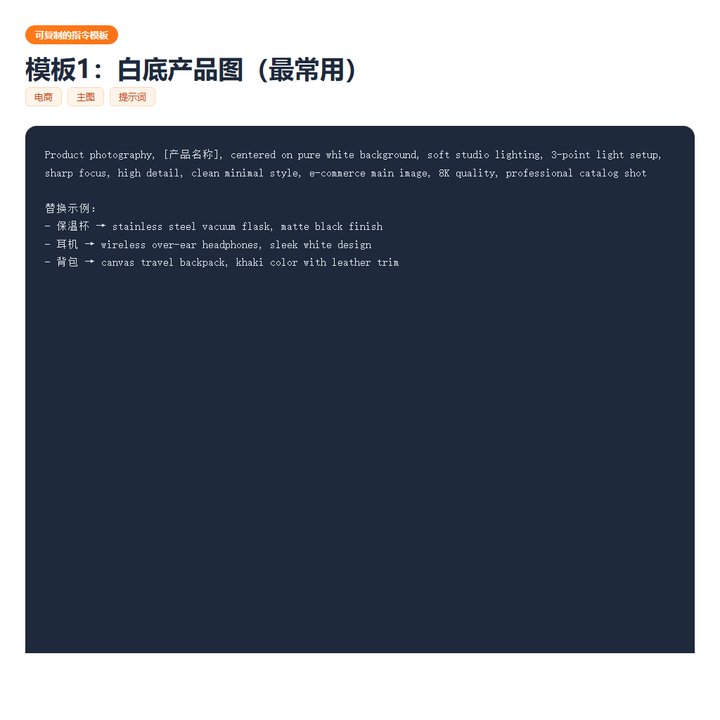
模板1:白底产品图(最常用)
模板1:白底产品图(最常用)
Product photography, [产品名称], centered on pure white background,
soft studio lighting, 3-point light setup, sharp focus,
high detail, clean minimal style, e-commerce main image,
8K quality, professional catalog shot
替换示例:
- 保温杯 →
stainless steel vacuum flask, matte black finish - 耳机 →
wireless over-ear headphones, sleek white design - 背包 →
canvas travel backpack, khaki color with leather trim
模板2:场景图(提升点击率)
模板2:场景图(提升点击率)
Lifestyle product photography, [产品名称], placed on [场景],
natural [时段] lighting, cozy atmosphere, shallow depth of field,
warm tones, Instagram aesthetic, e-commerce hero image,
high quality, inviting mood
模板3:细节特写图(打消顾虑)
模板3:细节特写图(打消顾虑)
Macro product photography, [细节部位] of [产品名称],
extreme close-up, showing [材质/工艺], soft diffused lighting,
sharp detail, texture visible, professional commercial shot,
8K, e-commerce detail image
模板4:对比图(突出卖点)
模板4:对比图(突出卖点)
Split comparison product image, left side [竞品描述],
right side [产品名称], same lighting and angle,
clean white background, red arrow pointing differences,
infographic style, e-commerce comparison chart,
professional product photography
模板5:卖点信息图(一图说清优势)
模板5:卖点信息图(一图说清优势)
Product infographic main image, [产品名称] centered,
with 4-6 feature callout bubbles around it,
minimal icons for each feature, clean typography,
white background, e-commerce banner style,
professional graphic design, high resolution
四、效果:从2天压缩到1小时
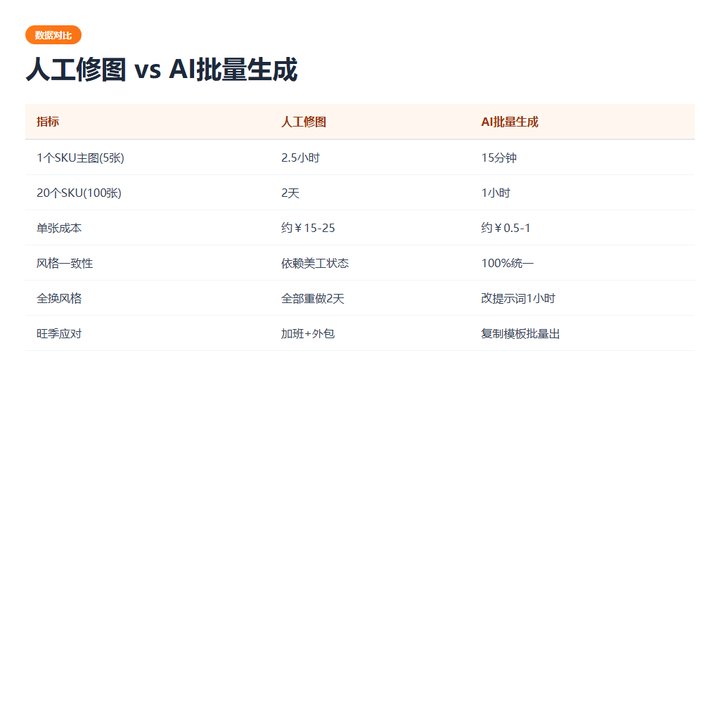
用这套模板的真实效果:
| 指标 | 人工修图 | AI批量生成 |
|---|---|---|
| 1个SKU主图(5张) | 2.5小时 | 15分钟 |
| 20个SKU主图(100张) | 2天 | 1小时 |
| 单张成本 | 约¥15-25 | 约¥0.5-1 |
| 风格一致性 | 依赖美工状态 | 100%统一 |
| 风格调整(全换) | 全部重做,2天 | 改提示词,1小时 |
| 旺季应对 | 加班+外包 | 复制模板,批量出图 |
一个真实案例:某天猫店主营厨房用品,旺季上新47个SKU。之前美工+外包做了整整11天,费用1.8万。换AI提示词模板后,运营自己写了47套提示词(每套5分钟),1个上午全部出完,质量反而更统一,总成本不到200块。
五、注意事项:AI能替代80%,但这3点必须人工把关
- 产品外形准确性 — AI有时会"脑补"产品细节(比如把圆形按钮画成方形),最终图必须和实物核对,特别是功能部件
- 文案和卖点 — AI能出图,但图上的文字/卖点需要人工填入,别指望AI写对"304不锈钢"这种专业术语
- 品牌调性 — 提示词模板需要定期根据品牌视觉规范微调,建议每月统一review一次
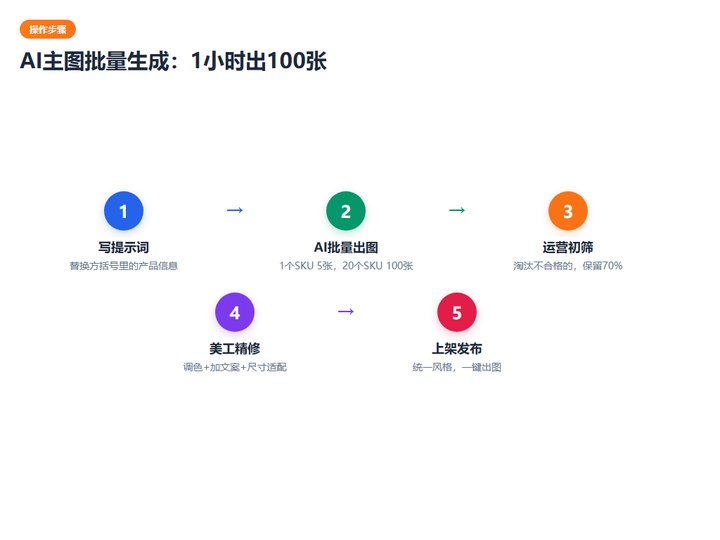
建议工作流:AI出图 → 运营初筛(淘汰30%不合格的)→ 美工精修(调色+加文案+尺寸适配)→ 上架
这样美工不再从零修图,而是做"精修师",效率提升至少5倍。
六、下一步
如果你也是电商运营或美工,可以先从模板1白底图入手,跑通一张产品的主图流程,再扩展到场景图和对比图。
提示词不用背,收藏这篇文章,每次上新直接复制替换。旺季再也不用熬夜修图了。
最新文章
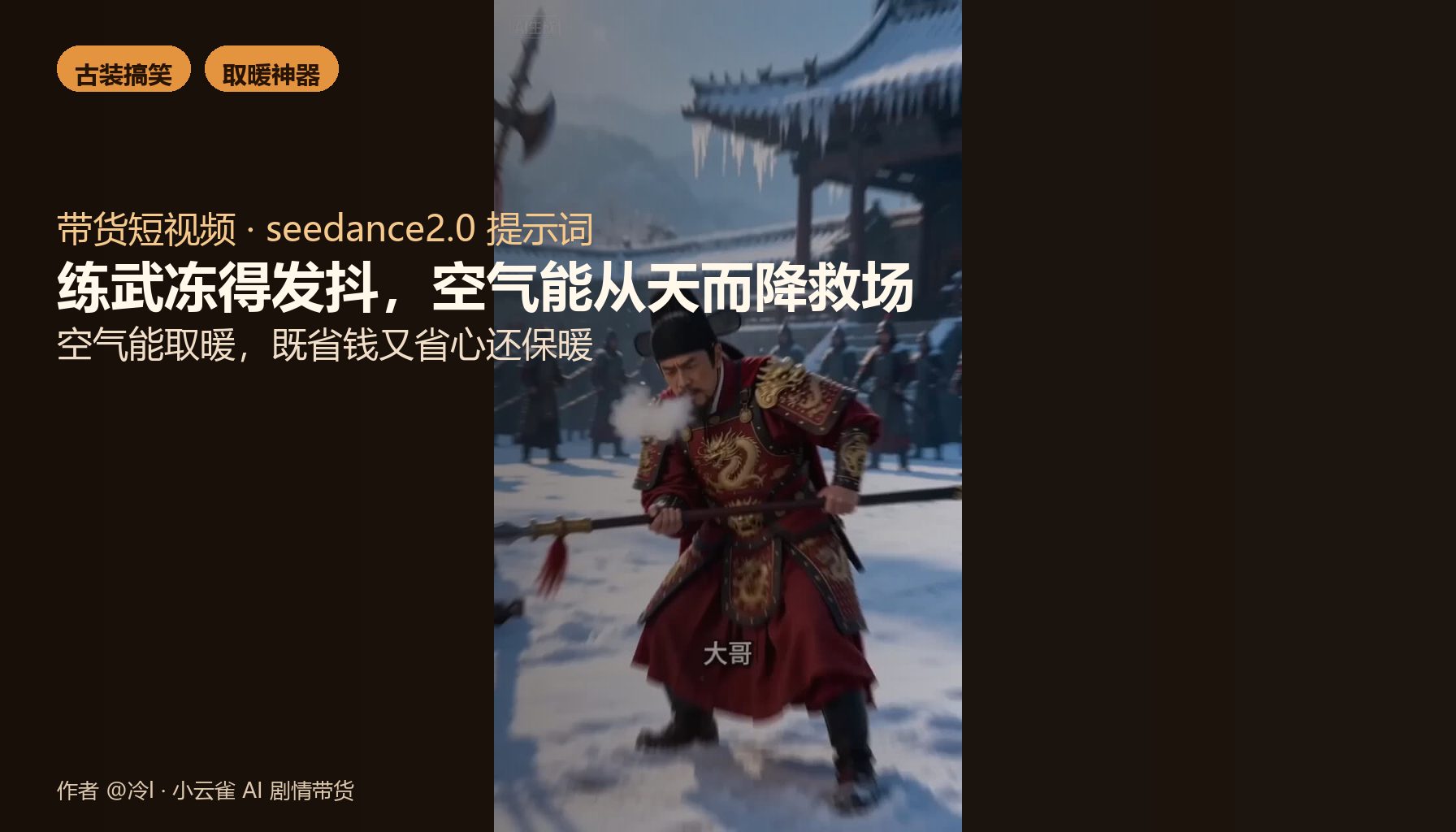
【带货短视频】【seedance2.0提示词】空气能取暖,古装冻僵兄弟遇空气能救场
8
2026-08-26
【带货短视频】【seedance2.0提示词】防切手刨丝器,女仆被羞辱掏出它当场翻盘
8
2026-08-26
【带货短视频】【seedance2.0提示词】被贵妃当众摔盘羞辱,她踩上一块板就赢了
7
2026-08-26
【带货短视频】【seedance2.0提示词】暴徒追杀竟为敬酒,UCOOL易拉罐红酒泰式反转炸场
7
2026-08-26
【带货短视频】【seedance2.0提示词】宫斗短剧一秒翻盘,梅花鹿芒果酪酪冰靠"爽口果料足"炸场
7
2026-08-26
【带货短视频】【seedance2.0提示词】被追问"香水谁送的",护手霜旋盖露出樱花香反杀
12
2026-08-26
热门文章


广西智慧万企传媒科技有限公司简称智慧万企,是一家为企业智慧经营全面赋能的营销科技公司。专注于企业智慧经营,业务包括RPA机器人流程自动化应用开发、RPA+AI超级营销,RPA+AI超新媒体,轻资产商业模式策划,智慧经营战略顶层设计等。
微信联系